ArtLoop: Learn how to draw
- 4.6
- Rating
- 5.00M
- Installs
- Free
- Price

 Analysis by App-foxy
I tried ArtLoop: Learn how to draw as a casual drawing companion rather than expecting a full professional art studio, and that distinction matters. This is an Art & Design app from LifeIsGame built around guided practice, approachable lessons, and drawing with other people. Its appeal is not a giant toolbox or a complicated canvas; it is the way it gives a beginner something concrete to do when a blank page feels intimidating.
The app is free to download and suitable for everyone, with optional in-app purchases priced at $0.99 per item. That makes it easy to test without committing money first. It has also reached over 5 million installs and holds a 4.7 average from around 51 thousand ratings, so it clearly has an audience beyond a small experiment. I can understand why: the learning path feels more inviting than opening a traditional drawing program and wondering which brush, layer, or setting to choose.
What using ArtLoop feels like today
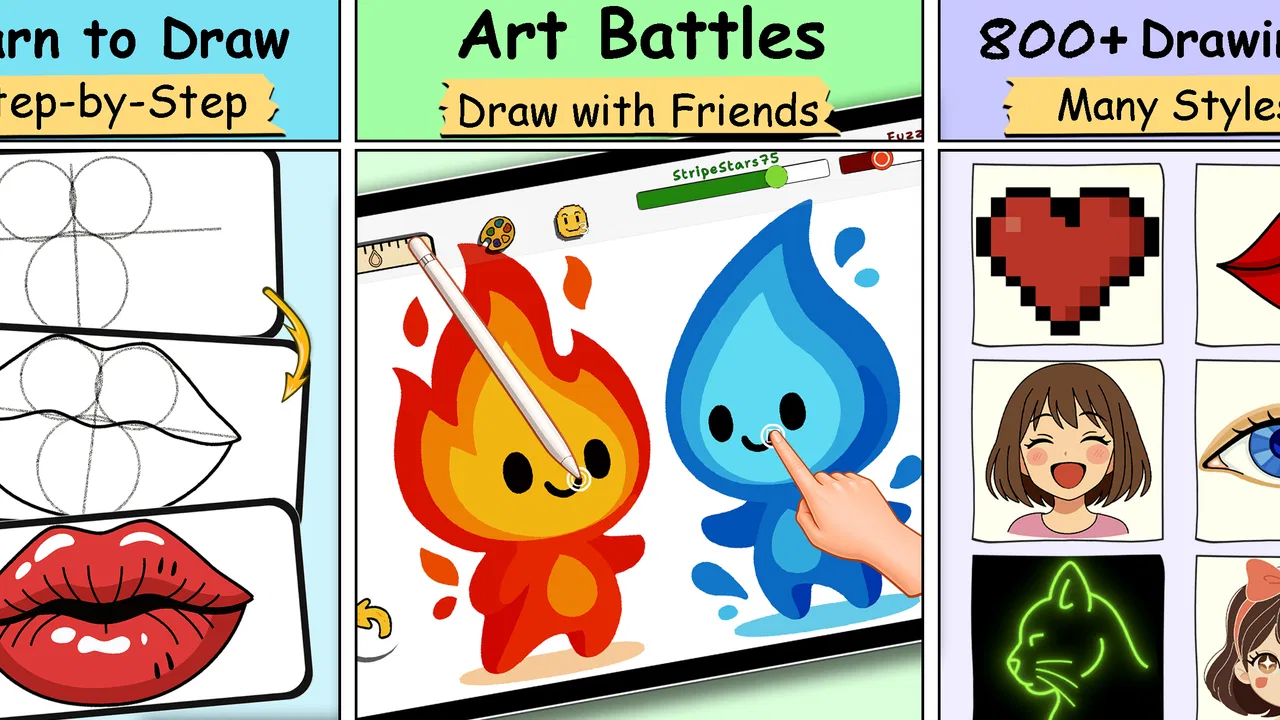
The central experience is step-by-step drawing. Instead of asking me to invent a subject immediately, the app breaks the activity into manageable actions. That structure is especially useful when you are learning hand control, proportions, or the basic order in which a simple illustration comes together. I could focus on one instruction at a time rather than judging the whole picture before it was finished.
You May Also Like

 Blood Strike: 2.5 Anniversary
Blood Strike’s Loadouts Turn Every Drop Into a Tactical Gamble
A close look at Blood Strike’s custom loadouts: how fast access to signature weapons reshapes its battle royale rhythm, rewards preparation, and narrows the gap between fights.

 Pandora - Music & Podcasts
Pandora’s Music Is Easy to Start, but Harder to Recover
Pandora’s strength is its low-effort path from a seed to a station. Its weak spot is how much confidence it asks you to place in connection, setup, and quiet recovery.

 8 Ball Pool
 Is Built on Rivalries, Rematches, and Routine
A close look at the rivalries, rematches, shared routines, and unanswered safety questions that turn a quick pool match into a persistent mobile community.

 Samsung Music
’s Quiet Strength Is Playing What You Already Own
Its reach comes less from spectacle than from dependable access to a personal library. That simplicity is both the app’s strongest retention engine and its ceiling.

 AccuWeather: Weather Radar
AccuWeather Review: A Quick, Clear Forecast for Everyday Decisions
For everyday plans, the best forecast is the one you can understand quickly. AccuWeather makes rain timing, radar, and local conditions easy to act on, with a few trade-offs.

 Hill Climb Racing
Why Hill Climb Racing Still Turns Crashes Into One More Run
A tiny car, a bumpy hill and one more upgrade: Hill Climb Racing keeps resurfacing because its simple chaos makes every near-miss feel personal.
More From Our News Desk



That approach makes the app feel closer to a guided exercise book than to a blank digital sketchpad. It is a good fit for someone who wants a short, low-pressure creative session after school, during a commute, or while taking a break from work. The lessons give the session a purpose, which is a small but important advantage over opening a general-purpose art app and losing time browsing tools.
The multiplayer drawing element adds a different reason to return. Drawing alongside another person can make practice less solitary, particularly for younger users or friends who want a simple shared activity. I would not treat it as a replacement for a serious collaborative illustration workflow, but it does make the app feel more social than a standard tutorial library.
The strongest part of ArtLoop is the reduction of decision fatigue. A beginner does not need to decide what to draw, how to start, or which advanced control to learn first. The app puts the next small action in front of the user. That sounds basic, but it is exactly the kind of support that helps people build a habit instead of abandoning drawing after one frustrating attempt.
A practical first session
For a realistic everyday example, imagine a parent looking for a quiet activity that a child can begin without constant explanation. ArtLoop can provide a guided starting point, while the adult joins in or lets the child work through the steps independently. The same setup works for an adult who has always wanted to draw but feels embarrassed by imperfect results. The lesson format shifts attention from “Am I talented?” to “What is the next line?”
I also found the guided format useful for warming up before more open-ended work. A short lesson can loosen the hand and refresh basic observation skills before moving to a notebook or another drawing program. In that role, the app is less about producing a polished final illustration and more about getting the user to pick up a digital pencil consistently.
Who will get the most from it
ArtLoop is best suited to beginners, families, casual hobbyists, and anyone who prefers instruction over experimentation. It is also a sensible choice for users who want drawing prompts without searching through videos or articles. The age rating of Everyone supports its broad, accessible positioning, although younger users may still benefit from an adult helping them understand the activity and any optional purchases.
It is less suitable for an experienced illustrator who needs precise layer management, detailed brush customization, professional export controls, or a serious portfolio workflow. A dedicated drawing suite will normally be the better choice for those needs. ArtLoop’s value comes from its guided simplicity, and that same simplicity becomes a limitation once you already know exactly how you want to build an image.
How the current version fits into the experience
The current release is version 1.7.95, and the app was released on September 28, 2024. I see that version information as useful context rather than a promise of a particular feature roadmap. It tells me that this is a relatively established product with an active version identity, not merely an abandoned one-off lesson pack. Still, a version number alone does not make the app professional; the important question is whether its present tools match your expectations.
For existing users, the current state should feel familiar if they came for guided drawing and light social interaction. The core reason to use it remains straightforward: open the app, choose a lesson, follow the sequence, and practice. I would not install a new update expecting it to transform the app into a completely different category. Its identity is still centered on accessible learning rather than unrestricted digital painting.
The developer, LifeIsGame, has positioned the product around an activity that benefits from repetition. That gives the app a different rhythm from a one-time creative toy. The more useful question is not whether one lesson produces a masterpiece, but whether the lesson format encourages you to return and gradually become more comfortable with shapes, lines, and visual structure.
What the guided format teaches well
One overlooked benefit is sequencing. Beginners often know what they want an object to look like but do not know which parts to draw first. Step-by-step instruction quietly teaches construction: establish a simple form, add recognizable details, and refine the result. Even when the subject is uncomplicated, that order can carry over into independent sketching.
Another useful habit is accepting imperfect lines. Because the lesson keeps moving, I am less tempted to erase every mark repeatedly. That is valuable practice. A polished art application can encourage endless adjustment because every control is available; a guided app can instead encourage completion. For someone stuck in perfectionism, finishing a modest drawing may be more educational than endlessly correcting the first outline.
A third insight is that multiplayer drawing can work as accountability. If a friend is participating, the session has a social reason to happen, not just an artistic one. That can help users who struggle to practice alone. The trade-off is that social activity may be less focused than private study, so I would use multiplayer for motivation and solo lessons for concentrated improvement.
Where it differs from usual alternatives
Compared with a blank canvas app, ArtLoop offers more direction and less creative freedom. That is a benefit when you are unsure how to begin, but a drawback when you want to design an original composition from scratch. A general sketching app is better for testing brushes, building layers, and developing a personal workflow. ArtLoop is better when the immediate goal is to complete a guided exercise.
Compared with video tutorials, the app feels more hands-on. A video can demonstrate a technique clearly, but it is easy to watch without actually drawing. ArtLoop’s lesson structure puts the activity in front of me and makes practice the main event. On the other hand, video instruction may explain artistic reasoning, anatomy, perspective, or material choices in greater depth. Users seeking theory rather than guided repetition may prefer a well-made course.
Compared with paper activity books, the app is more convenient for people who already use a phone or tablet and want a portable session. Digital drawing also avoids buying paper and pencils for every experiment. Paper remains better for users who dislike screens, want a tactile experience, or need a larger physical surface. ArtLoop is not automatically better; it simply removes some preparation and makes guided practice easier to carry around.
Small workflow choices that improve results
I recommend treating each lesson as a practice target instead of a test. First, follow the steps without trying to make the result perfect. Then, if the app allows you to revisit the activity, repeat it while paying attention to one specific issue, such as keeping curves smoother or spacing details more evenly. This two-pass method is more useful than rushing through many unrelated drawings.
It also helps to use multiplayer selectively. Invite someone who is comfortable keeping the mood relaxed rather than turning the session into a comparison. Drawing together works best when both people discuss choices and laugh at mistakes, not when one person finishes quickly and makes the other feel behind. The social feature is a reason to practice, but it should not become a performance test.
For parents, I would establish a simple rule before handing over the device: free lessons first, purchases only with permission. Since optional items cost $0.99 each, the amount is small per item but can still become an unwanted expense if a child taps through choices without supervision. This is not a criticism unique to ArtLoop; it is simply sensible housekeeping for any free creative app with optional purchases.
What may still frustrate experienced users
The same simplicity that helps beginners can feel restrictive after the novelty wears off. If you want to import a reference, control every aspect of a brush, manage a complex illustration, or prepare work for a professional destination, this is probably not the app I would choose. Its guided lessons can teach confidence, but they do not replace a broader art curriculum or a full digital studio.
There is also a motivational trade-off. Step-by-step activities are excellent when I need a prompt, yet they can become repetitive if I want constant novelty or complete control. Some users will enjoy the clear boundaries; others will quickly want to leave the lesson path and invent their own subjects. That is the point at which I would keep ArtLoop as a warm-up tool and switch to a more flexible app for the main project.
Multiplayer drawing may also be less useful if your friends are not interested in participating at the same time. Its value depends on having a willing partner, whereas a solo lesson is available whenever you are ready. I would not subscribe to the idea that the social feature alone justifies installing the app. It is a welcome extra for the right group, not the entire reason to use it.
Users should also keep expectations realistic about progress. Completing guided pictures can improve familiarity with drawing actions, but it does not automatically teach every foundation. Perspective, color theory, composition, and independent observation require additional practice. ArtLoop can be a friendly entry point, not a complete replacement for studying those subjects elsewhere.
Questions worth answering before installing
If you are wondering whether it is genuinely free to try, yes: the app is listed as Free, while optional in-app items cost $0.99 each. I would begin with the no-cost experience and decide whether the lesson style suits you before buying anything. The low individual price does not change the need to check each purchase carefully.
If device compatibility is a concern, the minimum operating system is Android 7.1. That makes the app accessible to many older Android devices, though the actual drawing comfort will still depend on screen size, touch response, and whether your device is pleasant to hold. A larger display is likely to make following visual steps easier than a very small phone screen.
If you are asking whether it is appropriate for children, the content rating is Everyone, and the teaching format is naturally approachable for younger beginners. I would still supervise purchases and multiplayer use, especially with children who are not used to managing app interactions independently. The rating describes broad content suitability, not a substitute for family rules.
If you already draw regularly, I would ask what kind of practice you want. For prompts, repetition, and a gentle reset when you feel stuck, ArtLoop can still be useful. For professional illustration, advanced editing, or complete control over the canvas, choose a dedicated art tool instead. The app is not failing when it does less; it is serving a narrower purpose.
What I would watch as the app develops
Future progress would matter most if it strengthens the learning loop without making the interface intimidating. I would be interested in how LifeIsGame continues balancing guided lessons with room for personal interpretation. More freedom could help returning users, but too many controls could weaken the beginner-friendly quality that makes the app approachable in the first place.
I would also watch whether multiplayer remains a meaningful part of the experience rather than a feature people try once. Social drawing has real potential when it helps friends practice regularly, but it needs to feel easy and welcoming. The best evolution would preserve the low-pressure atmosphere while giving repeat users fresh reasons to return.
For now, my recommendation is clear but specific: install ArtLoop if you want a friendly starting point, structured drawing exercises, and the option to practice with another person. Use it as a habit builder, a warm-up, or a family activity. Skip it if your priority is professional-grade control or completely open-ended digital art. In my experience, its success comes from knowing exactly what it is—a guided creative companion—and it is most enjoyable when you want help beginning, not when you already know every step you want to take.
FAQs for ArtLoop: Learn how to draw
01What devices are compatible with ArtLoop: Learn how to draw?
ArtLoop is designed to be compatible with both Android and iOS devices. It requires a minimum of Android 7.0 or iOS 11.0 to function smoothly. The app is optimized for tablets and smartphones, ensuring users have a seamless drawing experience on any compatible device.
02Is there a cost to download or use ArtLoop?
ArtLoop is available for free download on both the Google Play Store and the Apple App Store. While the app offers fundamental drawing tools at no cost, it also includes optional in-app purchases for advanced features and additional content, such as premium brushes and art courses.
03Does ArtLoop offer tutorials for beginners?
Yes, ArtLoop provides a comprehensive series of tutorials designed for beginners. The app includes step-by-step guides that cover basic drawing techniques and gradually introduce more complex concepts. Users can learn at their own pace, making it ideal for those new to digital art.
04Can I use ArtLoop offline?
ArtLoop offers limited functionality offline. While you can access basic drawing tools and save your work without an internet connection, advanced features and new content updates require online access. To fully benefit from the app's features, occasional internet connectivity is recommended.
05How does ArtLoop support creative sharing and collaboration?
ArtLoop includes features that enable users to share their artwork directly to social media platforms or within the app's community. Users can also collaborate with friends on joint projects by inviting them to edit shared canvases in real-time, fostering a creative and interactive environment.
Pros
- User-friendly interface for beginners.
- Wide variety of drawing tools.
- Includes step-by-step tutorials.
- Offline access to lessons available.
- Regular updates with new content.
Cons
- Limited features in free version.
- Occasional app crashes reported.
- Requires account for full access.
- Ads can be intrusive at times.
- Some tutorials lack depth.

ArtLoop: Learn how to draw
Gallery